Box: LSU Overview
This article has not been updated recently and may contain dated material.

General Information
Box is a cloud-based content management, file storage, and collaboration platform. Box allows users to store, access, share, and collaborate on files securely from any device.
Please note:
- LSU employees may utilize Box in two ways, individual Home Folders and Departmental Folders. Home Folders should house non-shared collaborative documents between you and a collaborator or small team. Departmental Folders are department-wide and are for both collaboration and storage. Departmental Folders work as long as the departmental Box account is active. Home Folders stop being accessible upon separation from LSU.
- If you separate from the University, any collaborated items that you are the owner of (documentation, content, and folders) will be lost to your collaborators. To prevent access disruption, it is best practice and highly recommended that any departmental content meant to be shared is put under a folder in the appropriate department's Box account with that account as the owner.
- If you download Box Desktop Applications (such as Box Drive), please note that you will need to store your files in the Box folder located on your computer for your files to be saved to Box. Box will not automatically save any files outside of the folder. For more information, please see the following article: Box: Marking Content for Box Sync
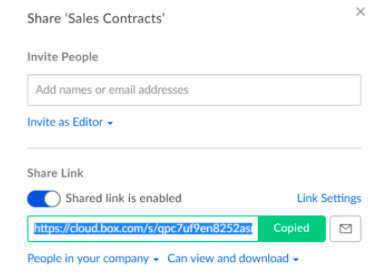
- When sharing files with others outside of LSU (including former students/faculty) please make sure to change the link sharing settings to People with the link. Otherwise, viewers will not be able to download any Box files without a Box account.
Eligibility Requirements
Available to: LSU A&M Faculty, Staff, and Student Employees.
Please note: Due to licensing limitations, other LSU campuses, secondary accounts, and students not employed by LSU are not eligible for Box.
Pre-Installation Notes
Review Installing and Updating Box Drive
Download and Install
To access Box, go to lsu.account.box.com and log in using your myLSU username and password. Please note, if you are off-campus you may be required to follow additional steps to prove your identity. If you need assistance or more information about this step please see Office365: Logging in with Multi-Factor Authentication (MFA).
Access Box on Mobile Devices
Download Box Drive
Support & Training
Box: Best Practices
Box: Support & Help
Box: Box University
Creating Shared Links
Departmental Box Accounts
Every department on campus has a corresponding Box account that is available to use. It is best practice and highly recommended that any content being shared with or collaborated on by multiple users is housed in a folder under your department's Box account with your department's account as the owner. This way, access to content is no longer dependent on a user's access to Box. For example if a user where to separate from the university or lose access to Box, any content they worked on will still be available to any and all collaborators. For more information on your departments Box account please get in contact with your department's TSP
User Separation
Employee Separation from University:
When an employee separates from the University, any content that the user is the owner of will no longer be accessible to any other collaborators that previously had access.
If your access is disrupted:
- Submit a help ticket via servicedesk@lsu.edu with the title "ATTN: Box Management - Disruption of Content Access"
- Within the body of the ticket, provide the following
- Name of content you no longer have access to
- Name of person and department who collaborated the content with you
- A member of the Box Management team will be in touch to help restore your access to the content
NOTE: If you experience a disruption of content access, you have 30 days from the start of the disruption to contact the Service Desk to request restoration of that access.
Referenced from: Box.com
16855
2/16/2026 4:16:19 PM